


Why Does the Chevrolet Infotainment Screen Go Black or Restart by Itself?
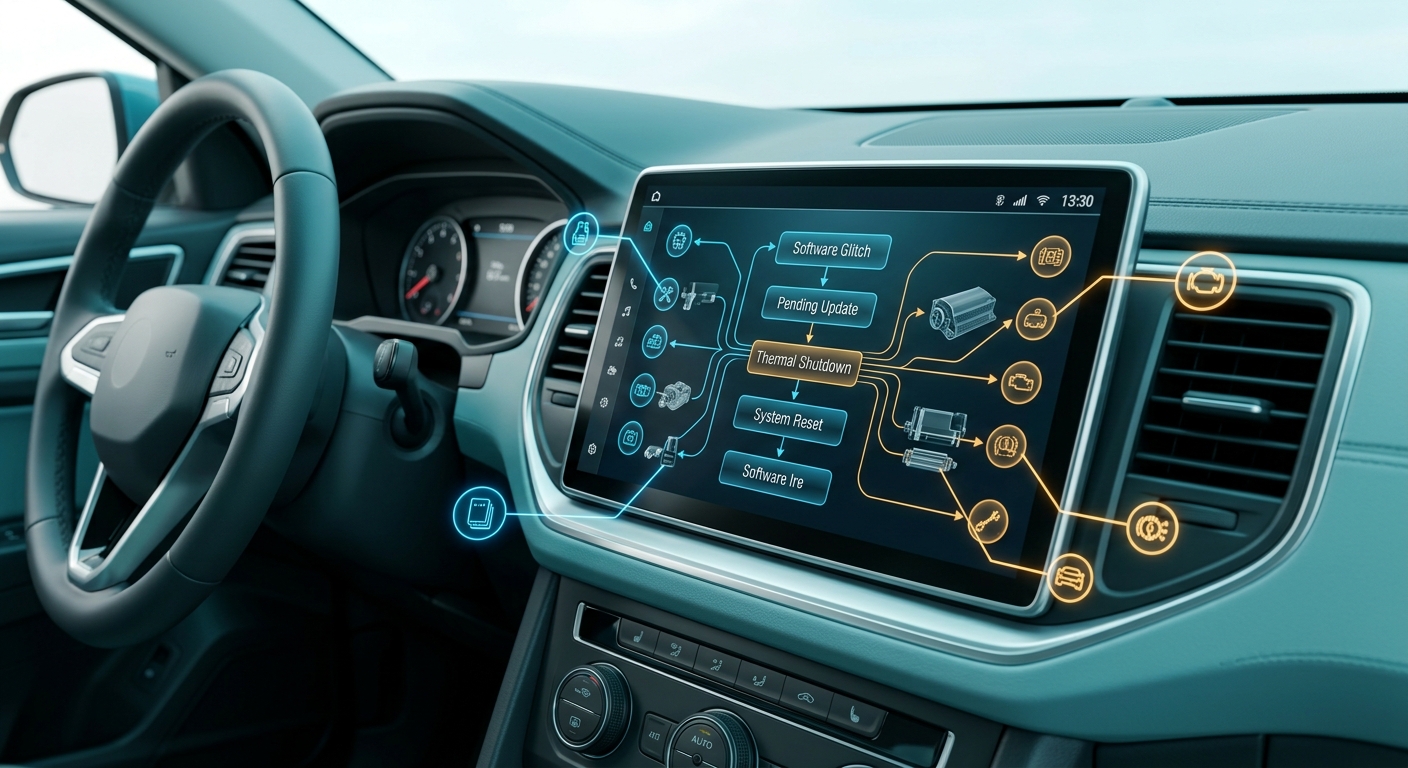
Spontaneous reboots or black screens in Chevrolet infotainment systems usually stem from a temporary software glitch, a pending over-the-air system update, a corrupted Bluetooth pairing profile, or system memory overload from multiple running background applications. A quick system soft reset using steering wheel controls often clears transient freezes. Persistent screen blanking typically requires clearing vehicle memory caches, updating system firmware, or inspecting hardware fuses at the service bay.
When you are preparing for a long weekend trip around Lake Guntersville, a sudden black screen on your central dashboard touchscreen can disrupt your navigation and vehicle settings. In most late-model Chevrolet trucks and SUVs, the display operates on a complex operating system that coordinates audio streaming, climate controls, driver assistance graphics, and smartphone mirroring. When software conflicts arise—such as an interrupted wireless handoff or an incomplete background application download—the internal processor automatically restarts the system to protect vehicle memory.
If the display goes entirely dark and fails to reboot automatically, the system may have entered a low-voltage recovery mode or encountered a tripped circuit component. Extreme ambient heat inside a parked vehicle can also trigger a thermal protection shutdown until cabin temperatures equalize. Drivers can perform an initial system check by turning off the ignition, opening the driver door to cut residual accessory power, waiting 5 to 10 minutes, and restarting the engine.
If soft resets fail to restore display functionality, an underlying software update failure or power delivery issue may be present. For hands-on technical support or hardware diagnostic evaluations, drivers can find our showroom and service center location right on Highway 431, or get immediate guidance by giving our service desk a call.
Table of Contents
- How Do You Troubleshoot a Freezing Chevrolet Infotainment System Before a Road Trip?
- How Do Over-the-Air Software Updates Work and Do They Require Wi-Fi?
- Can a Blown Fuse or Hardware Power Issue Disable Your Touchscreen Display?
- What Touchscreen Sizes and Connectivity Features Are Included in 2026 Chevrolet Models?
- Is Apple CarPlay Supported in 2026 Chevy Models and How Does Google Built-In Work Without Data?
- Common Questions About Chevrolet Infotainment and Road Trip Tech Support
- Reliable Connectivity and Technical Care at Guntersville Chevrolet
How Do You Troubleshoot a Freezing Chevrolet Infotainment System Before a Road Trip?
Troubleshooting a frozen Chevrolet infotainment display before setting out on a highway journey requires performing a soft manual reset, unpairing non-essential Bluetooth devices, and clearing cached application data. Drivers can initiate a soft reset on most modern models by holding the end-call button on the steering wheel control cluster for 10 to 15 seconds until the screen cycles off and displays the Chevrolet boot graphics.
Software lockups frequently happen when a mobile device attempts to synchronize phonebook contacts or stream audio while the central processor is loading native vehicle apps. Unpairing old phone profiles from the vehicle settings menu reduces memory load and prevents wireless connection conflicts. If the touchscreen freezes specifically while launching navigation or media applications, checking your paired smartphone for pending app or operating system updates before leaving home ensures maximum stability on the highway.
- Turn off the vehicle ignition, open the driver door for 30 seconds to cut accessory power, and restart the engine.
- Press and hold the steering wheel telephone hang-up button for 10 to 15 seconds to command an operational system reboot.
- Delete unused mobile device profiles from the system Bluetooth settings to eliminate communication memory bottlenecks.
- Confirm your paired mobile device is running the latest software version to prevent app mirroring lockups.
- Remove aftermarket USB thumb drives or auxiliary media cords that might introduce corrupted audio files to the system buffer.
For families commuting across the Sand Mountain plateau near Albertville, keeping cabin entertainment running smoothly makes every long drive easier. If an accessory cable or hardware connector is physically damaged, drivers shopping for factory-approved equipment can order genuine GM replacement parts online directly through our component department. When evaluating upgrade paths for your household, you can also explore our pre-owned vehicle inventory to compare model years and tech packages in person.
Engine & Performance
Powertrain specs by trim
| Feature | AWD High Country | AWD LT | AWD RS | AWD Z71 | FWD High Country | FWD LT | FWD RS |
|---|---|---|---|---|---|---|---|
| Engine | 2.5L | 2.5L | 2.5L | 2.5L | 2.5L | 2.5L | 2.5L |
| Horsepower | 328 hp | 328 hp | 328 hp | 328 hp | 328 hp | 328 hp | 328 hp |
| Torque | 326 lb-ft | 326 lb-ft | 326 lb-ft | 326 lb-ft | 326 lb-ft | 326 lb-ft | 326 lb-ft |
| Transmission | automatic 8-speed | automatic 8-speed | automatic 8-speed | automatic 8-speed | automatic 8-speed | automatic 8-speed | automatic 8-speed |
| Drivetrain | All-wheel drive | All-wheel drive | All-wheel drive | All-wheel drive | Front-wheel drive | Front-wheel drive | Front-wheel drive |
How Do Over-the-Air Software Updates Work and Do They Require Wi-Fi?
Chevrolet over-the-air (OTA) software updates deliver wireless operational patches and application updates directly to your vehicle’s central touchscreen interface without requiring a physical shop visit. Small system patches download automatically through the vehicle’s built-in cellular data connection, whereas larger operating system upgrades require an active local Wi-Fi connection or an active OnStar data plan to complete the download.
When a software update becomes available for your vehicle, a prompt appears on the center touchscreen display. Drivers can check for pending updates manually by tapping the Settings icon, navigating to the System menu, and selecting Software Updates. Prior to approving the installation process, the vehicle must be parked safely with the ignition off, the parking brake set, and the battery maintaining healthy charge levels.
- System notification icons inform the driver whenever a new package is ready for download or installation.
- Minor software fixes download seamlessly in the background while driving using cellular signals.
- Major firmware installations prompt the driver to connect to a home Wi-Fi network or mobile hotspot.
- Vehicles must remain parked and turned off during the 10 to 20 minute installation window.
- Automatic update preferences can be adjusted inside the system settings menu at any time.
Whether you are driving a factory-fresh model or researching options within our certified pre-owned inventory, maintaining up-to-date system software keeps your touchscreen graphics sharp and responsive. For drivers who want to enhance their road trip setup with smartphone mounts, wireless charging pads, or utility organizers, our team can help you browse the official Chevrolet accessories catalog to tailor your vehicle interior for upcoming travels.
Can a Blown Fuse or Hardware Power Issue Disable Your Touchscreen Display?
A blown electrical fuse in the main cabin fuse block will immediately cut power to the central display screen, rendering the touchscreen completely dark and non-responsive. The primary fuse protecting the screen logic board and main control unit is located in the interior instrument panel fuse block, usually designated under labels such as Radio, Info, or Display.
Replacing a blown fuse requires pulling the panel cover, referencing the diagram printed inside the cover, and using a fuse puller to inspect the internal metal filament. If the fuse filament is broken, installing an exact amp-rated replacement fuse restores electrical current. However, if a fresh fuse blows immediately after installation, an underlying wiring harness short or internal radio transceiver fault is present and requires professional diagnostic equipment.
When experiencing persistent electrical issues or unexpected component failures during extended travel, vehicle owners benefit from manufacturer-backed protection. Owners can contact Chevrolet Roadside Assistance at 1-800-243-8872 for emergency towing, battery jump-starts, and technician dispatch to an authorized dealer service center. Manufacturer coverage provides factory-trained technicians, genuine original equipment parts, and dedicated diagnostic tools to safeguard your warranty. To resolve persistent electrical glitches quickly, customers can easily book a service appointment online for comprehensive system diagnostics.
What Touchscreen Sizes and Connectivity Features Are Included in 2026 Chevrolet Models?
The 2026 Chevrolet vehicle lineup offers expansive digital displays paired with intuitive connectivity suites engineered to keep drivers informed and passengers entertained. Touchscreen dimensions vary by vehicle class, expanding from practical 11-inch driver displays on compact models up to available 17.7-inch diagonal free-form touchscreens on full-size trucks and family haulers.
For multi-row utility, the 2026 Chevrolet Traverse High Country features an advanced cabin layout anchored by a 2.5L turbocharged engine generating 328 hp and 326 lb-ft of torque through an 8-speed automatic transmission. With about 23 cu ft of standard cargo space behind the third row and a seating capacity for 7 passengers, the Traverse provides ample room for family gear while keeping everyone connected through multiple fast-charging USB ports and built-in navigation options.
For maximum cabin capacity and towing muscle, full-size models like the 2026 Chevrolet Suburban Premier incorporate a powerful 6.2L V8 engine delivering 420 hp paired with a smooth 10-speed automatic transmission. The Suburban offers about 41.5 cu ft of cargo volume behind the third row, 7-passenger seating, and available rear-seat entertainment screens. Truck buyers seeking work-ready strength will appreciate the 2026 Chevrolet Silverado 1500 LTZ, equipped with a 2.7L engine, Hydra-Matic transmission, a 9,000 lbs towing capacity, and intelligent trailering camera technology.
| Feature | AWD High Country | AWD LT | AWD RS | AWD Z71 | FWD High Country | FWD LT | FWD RS |
|---|---|---|---|---|---|---|---|
| Seating | 7 | 7 | 7 | 7 | 7 | 7 | 7 |
| Cargo | 22.9 cu ft | 22.9 cu ft | 22.9 cu ft | 22.9 cu ft | 22.9 cu ft | 22.9 cu ft | 22.9 cu ft |
Shoppers ready to compare interior layouts and digital display configurations can explore our new Chevrolet model showroom online. If you plan to upgrade your current vehicle, our online tools allow you to value your trade-in quickly from home to streamline your buying decision.
Dimensions & Capacity
Capacity and dimensions by trim
| Feature | AWD High Country | AWD LT | AWD RS | AWD Z71 | FWD High Country | FWD LT | FWD RS |
|---|---|---|---|---|---|---|---|
| Seating | 7 | 7 | 7 | 7 | 7 | 7 | 7 |
| Cargo | 22.9 cu ft | 22.9 cu ft | 22.9 cu ft | 22.9 cu ft | 22.9 cu ft | 22.9 cu ft | 22.9 cu ft |
Is Apple CarPlay Supported in 2026 Chevy Models and How Does Google Built-In Work Without Data?
Wireless Apple CarPlay and wireless Android Auto remain fully supported across all 2026 gasoline-powered Chevrolet vehicles, enabling seamless smartphone integration for calls, messaging, and audio streaming. Built-in smartphone mirroring allows drivers operating models like the 2026 Silverado 1500 LT Trail Boss to project their phone apps directly onto the main center screen without needing a physical USB cable.
Many 2026 Chevrolet trucks and SUVs also incorporate Google built-in capability, which embeds Google Assistant, Google Maps, and Google Play natively within the infotainment firmware. If an active OnStar data plan expires or cellular signals drop in remote areas, offline features like standard AM/FM radio, Bluetooth audio streaming, and pre-downloaded Google Maps routes remain operational. Real-time traffic alerts and streaming apps simply pause until data connectivity is re-established.
- Gas-powered Chevy vehicles maintain full compatibility with wireless Apple CarPlay and wireless Android Auto.
- Native Google built-in software delivers direct voice control for vehicle climate and radio settings.
- Offline navigation functions reliably if map areas are cached to vehicle memory prior to lost cellular signal.
- Bluetooth connectivity stays active for local phone calls regardless of subscription status.
When you are ready to evaluate new tech features or discuss purchasing options, our business team is here to assist. You can Learn More, Schedule Your Test Drive, Check Financing Options, or Book Service Appointment with our specialists. To review financing paths built around your household budget, take a moment to submit an online credit application before visiting our dealership.
Common Questions About Chevrolet Infotainment and Road Trip Tech Support
Q: How do I perform a soft reset on my Chevy touchscreen?
A soft reset is performed by placing the vehicle in Park with the engine running and holding the end-call button on the right side of the steering wheel for roughly 10 to 15 seconds. The central touchscreen will go dark, clear its temporary operational cache, and initiate a full reboot sequence without erasing your saved radio presets or personal driver profile preferences.
Q: Does offline Google Maps work if my OnStar data plan expires on a highway trip?
Offline Google Maps continues to function without an active data subscription provided the geographic map area was downloaded to internal vehicle storage while connected to Wi-Fi. Turn-by-turn routing along the saved path remains active, though real-time traffic updates, satellite imagery overlays, and online point-of-interest search results will be unavailable until cellular data reconnects.
Q: Why does my phone keep disconnecting from wireless Android Auto while driving?
Frequent wireless disconnections usually point to aggressive battery-saver settings on your mobile device, temporary Wi-Fi channel interference inside the cabin, or multiple paired devices competing for connection priority. Clearing the Bluetooth cache on your phone, toggling airplane mode, and deleting unused phone profiles from the vehicle’s device manager generally resolves connection drops.
Q: Are over-the-air software updates covered under my factory warranty?
Over-the-air software updates delivered directly to the vehicle dashboard are provided by the manufacturer to keep system applications operating smoothly. Standard software patches and firmware upgrades performed at an authorized service center during the factory bumper-to-bumper warranty period carry full coverage when addressing documented technical bulletins or hardware performance issues.
Q: What should I bring to the service bay if my screen requires a diagnostic scan?
When bringing your vehicle in for touchscreen troubleshooting, bring all key fobs used by your household and the mobile device you primary pair to the vehicle. Providing our service advisors with details on when the reboot occurred—such as specific weather conditions, connected USB accessories, or active navigation apps—helps our technicians pinpoint software bugs faster.
Reliable Connectivity and Technical Care at Guntersville Chevrolet
Keeping your dashboard technology, smartphone integration, and navigation systems operating flawlessly ensures every drive remains safe and enjoyable for your family. Whether you are addressing an unexpected system glitch before a holiday drive or upgrading to a vehicle with the latest digital touchscreen interface, our team delivers straight answers and dependable support.
Our service department is equipped with factory diagnostic tools and certified technicians who understand Chevrolet electrical architectures inside and out. From resolving complex software glitches to completing routine maintenance, we provide thorough, reliable care tailored to your busy work and travel schedule.
Ready to experience modern Chevy connectivity firsthand? We invite you to get directions to our dealership and explore our full lineup of trucks, SUVs, and cars. You can also support local outreach by discovering our community initiatives for breast cancer awareness or by calling our service advisors directly to schedule your next tech inspection today.
0 comment(s) so far on Why Does the Chevrolet Infotainment Screen Go Black or Restart by Itself?